Agents en production — Automatisation, supervision et cas d'usage réels
Déployer des agents IA en production : patterns, supervision, scaling, exemples concrets par industrie.
De demo à production
En démo : Une requête = agent répond. En production : Centaines par jour, 24/7, avec risques réels.
3 patterns de production
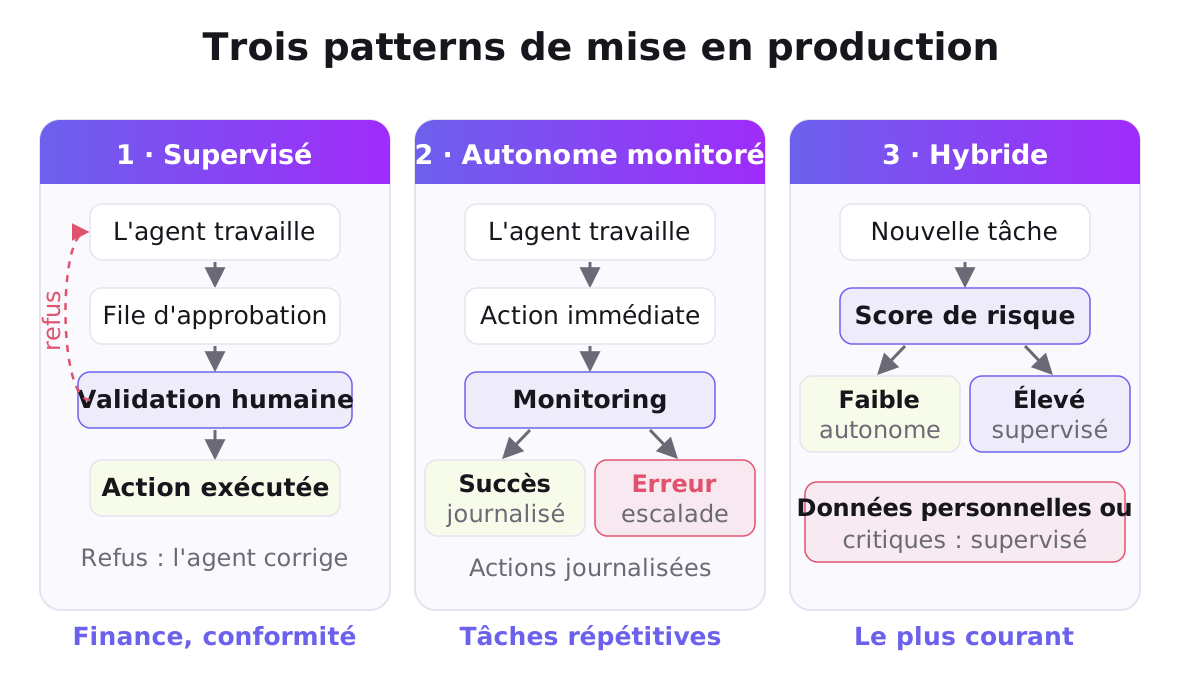
Pattern 1 : Supervised Automation
Agent runs, human reviews before action.
Workflow:
1. User submits request
2. Agent runs (max 5 iterations)
3. Agent output → Approval queue
4. Human reviews (2 min max)
5. If approved → Execute final action
6. If rejected → Agent refines & resubmit
Best for : Financial decisions, customer communication, compliance.
Pattern 2 : Autonomous with Monitoring
Agent runs and acts, monitoring for anomalies.
Workflow:
1. Agent runs autonomously
2. Execute result immediately
3. Monitor : Did it work ? Errors ?
4. If error → Escalate to human
5. If success → Logged
Best for : Repetitive tasks (support triage, data ingestion), high-volume.
Pattern 3 : Hybrid (Most common)
Low-risk tasks = autonomous. High-risk = supervised.
If (task_risk_score < 3 and not_involves_pii and not_critical) {
    autonomous()
} else {
    supervised_with_human_approval()
}
Cas d'usage réels
Finance : Invoice processing agent
Tools:
- ocr_invoice() → extract {vendor, amount, date, items}
- validate_against_po() → {valid, discrepancies}
- create_payment() → {payment_id, status}

Workflow:
1. Invoice arrives
2. Agent OCRs it
3. Validates against PO
4. If match → Auto-approve (if <$10k)
5. If discrepancy → Escalate to AP team
6. Logs every step
Support : Ticket routing agent
Tools:
- analyze_sentiment()
- classify_issue()
- get_kb_suggestions()
- create_ticket()
- assign_to_team()

Workflow:
1. Customer message arrives
2. Agent analyzes tone + issue
3. If FAQ-able → Auto-reply with KB
4. If needs human → Create ticket + route to team
5. Measure : % resolved auto vs routed
HR : Resume screening agent
Tools:
- extract_resume()
- match_against_jd()
- score_candidate()
- send_status_email()

Workflow:
1. Resume submitted
2. Agent extracts key info
3. Scores against JD (match %, red flags)
4. If score > 75% → Pass to recruiter
5. If score < 40% → Auto-reject (email candidate)
6. Middle range → Recruiter reviews
Production checklist
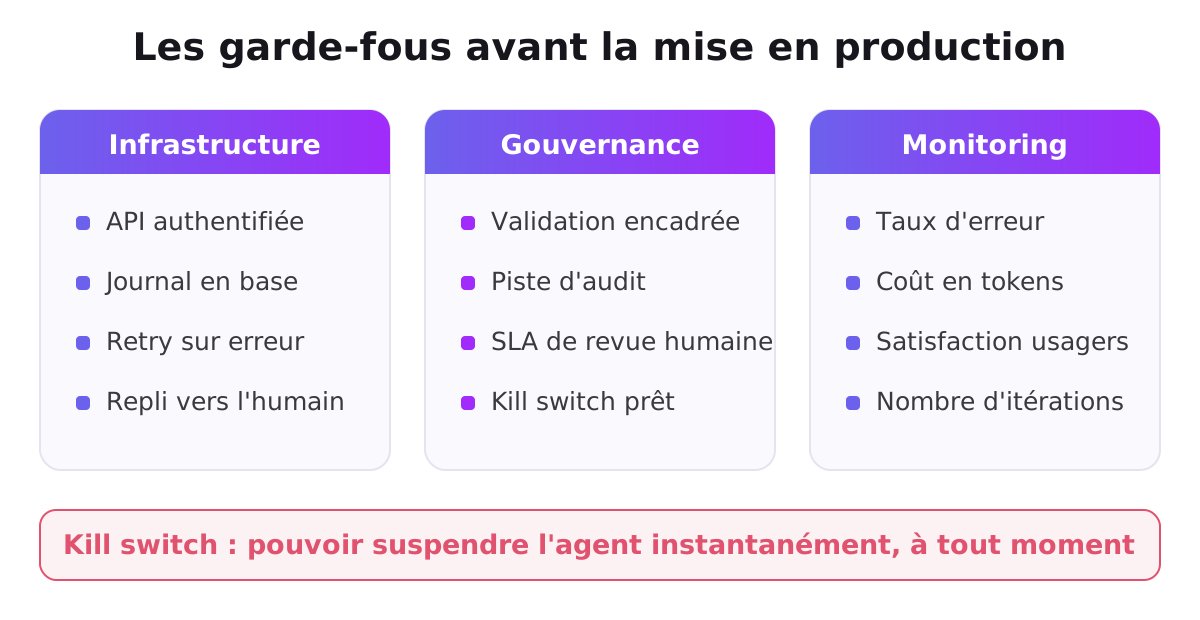
Infrastructure
- [ ] API for agent to call tools (rate-limited, authenticated)
- [ ] Database logging every action
- [ ] Error handling + retry logic
- [ ] Monitoring + alerting (if agent fails)
- [ ] Fallback : if agent crashes, escalate to human
Governance
- [ ] Approval workflow for high-risk actions
- [ ] Audit trail (who/what/when/why)
- [ ] SLA for human review (if supervised)
- [ ] Kill switch : ability to pause agent instantly
Monitoring
- [ ] Dashboard : % automated vs supervised
- [ ] Error rate tracking
- [ ] User satisfaction (did agent help ?)
- [ ] Cost tracking (token usage)
- [ ] Iteration count (is agent looping too much ?)
Performance metrics
| Metric | Target | Red flag |
|---|---|---|
| First-time resolution | >70% | <50% |
| Avg tool calls/request | 3-5 | >10 (looping) |
| Escalation rate | 20-30% | >50% |
| Human review time | <2 min | >5 min |
| Error rate | <1% | >3% |
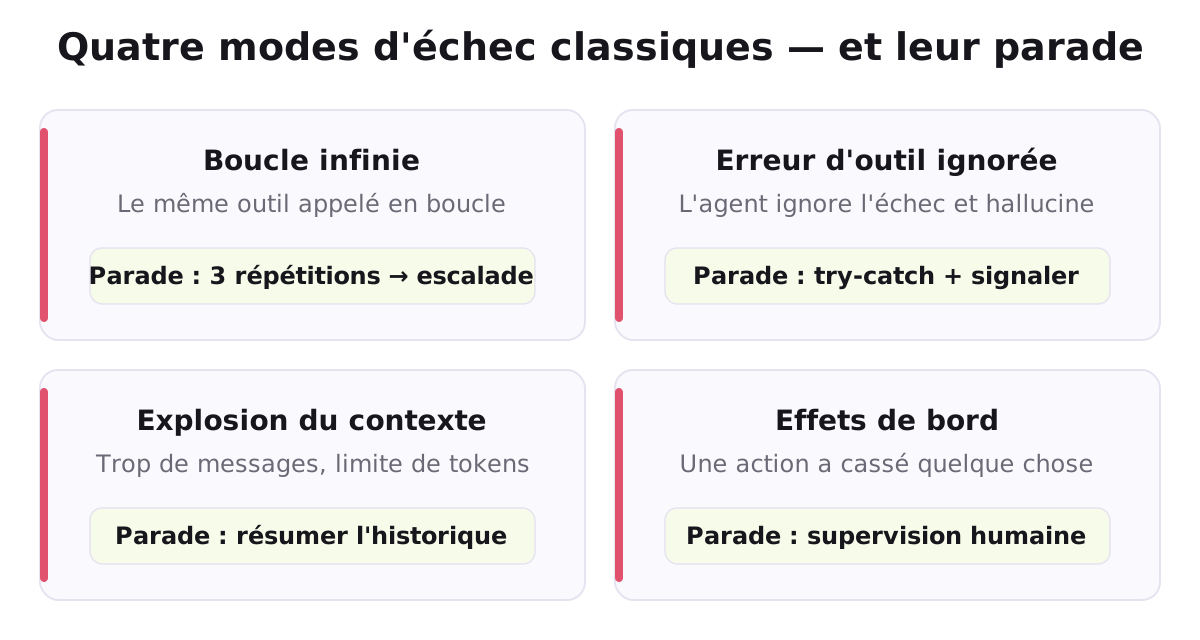
Common failure modes
❌ Failure 1 : Agent gets stuck in loop
Calling same tool repeatedly without progress.
Fix : Track tool call history. If repeated 3x → escalate.
❌ Failure 2 : Tool error not handled
Tool returns error → Agent ignores → produces hallucination.
Fix : Wrap all tool calls in try-catch. Tell Claude "tool failed."
❌ Failure 3 : Context explosion
Too many messages → token limit → Claude cuts off.
Fix : Summarize old messages. Keep only recent context.
❌ Failure 4 : Unintended side effects
Agent's action broke something (sent wrong email, etc.).
Fix : Always supervised for actions with side effects.
À lire ensuite : Monitoring et évolution des agents — Logs, feedback, auto-improvement
: la modale et son overlay sont volontairement HORS de .tutoriel-container (ci-dessous) pour ne jamais être capturés par le split de contenu de tutoriel-gating.js, qui vide et reconstruit innerHTML de part et d'autre du marqueur — sinon la modale se retrouvait imbriquée dans .tutoriel-gated (donc cachée avec lui) et devenait impossible à afficher. -->Voir tout le parcours du tutoriel →

Le jumeau numérique de Youssef te répond en direct — il connaît la méthode et peut t'expliquer autrement.
Envie d'aller plus loin avec l'IA ?
Nos formations sont live, pratiques et certifiantes — appliquées à ton métier.
Voir les formations